Share This Page
| Home | | Java | | | | Share This Page |
A signal processing workshop.
Copyright © 2009, Paul Lutus — Message Page
Current Version: 3.9 (05/16/2011)
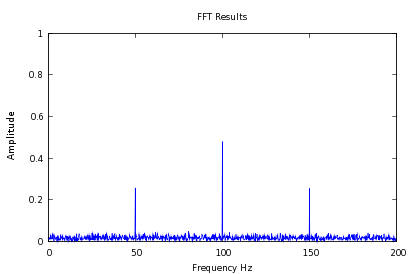
$ ./signal_source -a 2048 -s 400 -f 100 -m 50 -n 3 | ./fft_processor | ./gnuplot_driver -p— and get this as a result:
Well, that was fine for Linux users and college students, but I wanted something more suitable for math or physics students who weren't necessarily computer programmers. I wanted a self-contained program that people could play with, while acquiring some education as a secondary and perhaps unintended side effect. So I bundled the basic code in a popular GUI wrapper that comes with Linux (Qt).
As it turns out, I couldn't have made a worse choice for either my GUI utility or my choice of language (C++). As to the latter, I spent years answering inquiries from people who couldn't compile or run my application, and from package maintainers who wanted to make my application a standard Linux download. But satisfying these people meant I had to constantly rewrite my code to accommodate the kind of narcissistic technologist who adds or removes something from a programming environment without bothering to ask himself how many programs his whimsical change will break.
Then the show-stopper — Trolltech decided to "upgrade" Qt, the GUI interface I chose for this and several other projects. The Qt "upgrade" provided no rearward compatibility path at all — which meant programmers using Qt had to drop whatever they were doing and write their programs over again, essentially from scratch. I was suddenly faced with half a dozen major projects that had become obsolete overnight for reasons having nothing to do with their age or usefulness (none were older than five years old).
But, rather than repeat past mistakes, I rewrote all my recent projects in Java, which turns out to be a much more stable environment with the added advantage that Java projects are innately cross-platform compatible (because a Java runtime engine is available for most modern operating systems). Here's a list of recently rewritten or substantially upgraded Java projects:
Nearly all these projects were originally written in C++ or another language and had to be constantly revised to keep up with the narcissists, and all these programs have since been rewritten in Java.
The most recent rewriting project was this one, which I frankly didn't expect to work very well, for the reason that the Fast Fourier Transform is very processing-intensive and Java uses a virtual-machine scheme to accomplish its platform indifference (virtual languages can't run as fast as native ones). But to my surprise, in side-by-side comparison, the new Java version and the old C++ version were scarcely distinguishable.
It turns out I had misjudged the FFT processing contribution to total program runtime. The majority of program time is spent drawing graphic images and reading signal sources, and only a small percentage of time is spent in serious number-crunching. And the Java version includes a number of improvements over the old program, not least of which is the abillity to run in a Web page.
There are no guarantees, and the Java maintainers might try to "improve" Java in a way that breaks every Java program in existence, but the long and successful history of my first Java conversion project (Arachnophilia) offers reason for hope.
| Home | | Java | | | | Share This Page |